Rubyfpv · Lab · 接力台
我自己每天在用的工具 · 早期版本A tool I actually use every day · Early version
接力台:3 个 AI、2 台电脑,都从同一个地方接着做Relay Desk: 3 AIs, 2 Macs, one place to pick up where you left off
我一个人做视频,同时用 Claude、Codex、GPT 三个 AI,在两台电脑上分工。最费时间的不是做,是接。接力台给一个人带着几个 AI 做内容的创作者用:任何时候打开,都知道做到哪、轮到谁、下一步点哪里。
I make videos on my own, with Claude, Codex and ChatGPT splitting the work across two Macs. The slow part isn’t making things. It’s the handoffs. Relay Desk is for solo creators working with several AIs: open it any time and you know where things stand, whose turn it is, and what to click next.
1 分钟演示 · 画面全是真实截图1-minute demo · every screen is real

问题The problem
卡住我的,从来不是「不会做」What stalls me is never “I don’t know how”
GPT 那台生成的结果,这台的 AI 不知道,得我来回传话。
Whatever ChatGPT makes on one Mac, the AI on the other knows nothing about, so I end up passing messages back and forth.
提示词在某段聊天里,参考图在某个文件夹,上传顺序还得想一遍。
The prompt is somewhere in a chat, the references are in some folder, and I still have to work out the upload order.
对话一长就要开新的,前面定好的东西又要解释一遍。
Once a chat gets too long I have to start a new one and explain everything we’d already settled all over again.
「当时因为寻找素材的路径太复杂,我没有继续。」我在 10 月 31 日的原话,现在就写在面板的「停下的原因」里。
“Finding the files was such a maze that I just stopped.”My own words on Oct 31, now recorded on the progress page under “why it stopped”.
现在已经能做的What it does today
五件事,都在每天的真实工作里用着Five things, all in real daily use
01
一件作品一页进度One progress page per project
现在停在第几步、轮到谁、已经核实完成几步,最上面一眼看清。主线和分支分开,分支不会把主线冲掉。
The current step, whose turn it is and how many steps are verified done, all at the top. Main line and side quests are kept apart, so detours don’t bury the main job.

02
每一步都能「接着做」Every step can be resumed
停下的原因、下一步谁做、提示词、素材文件夹、上传顺序、结果放哪,一张卡片里全有。点「一键开始」:提示词复制好,素材文件夹和上传顺序一起打开。
Why it stopped, who’s next, the prompt, the asset folder, the upload order and where results go, all on one card. Hit “Start”: the prompt is copied and the folder and upload order open together.

03
两台电脑,各管一件事Two Macs, one job each
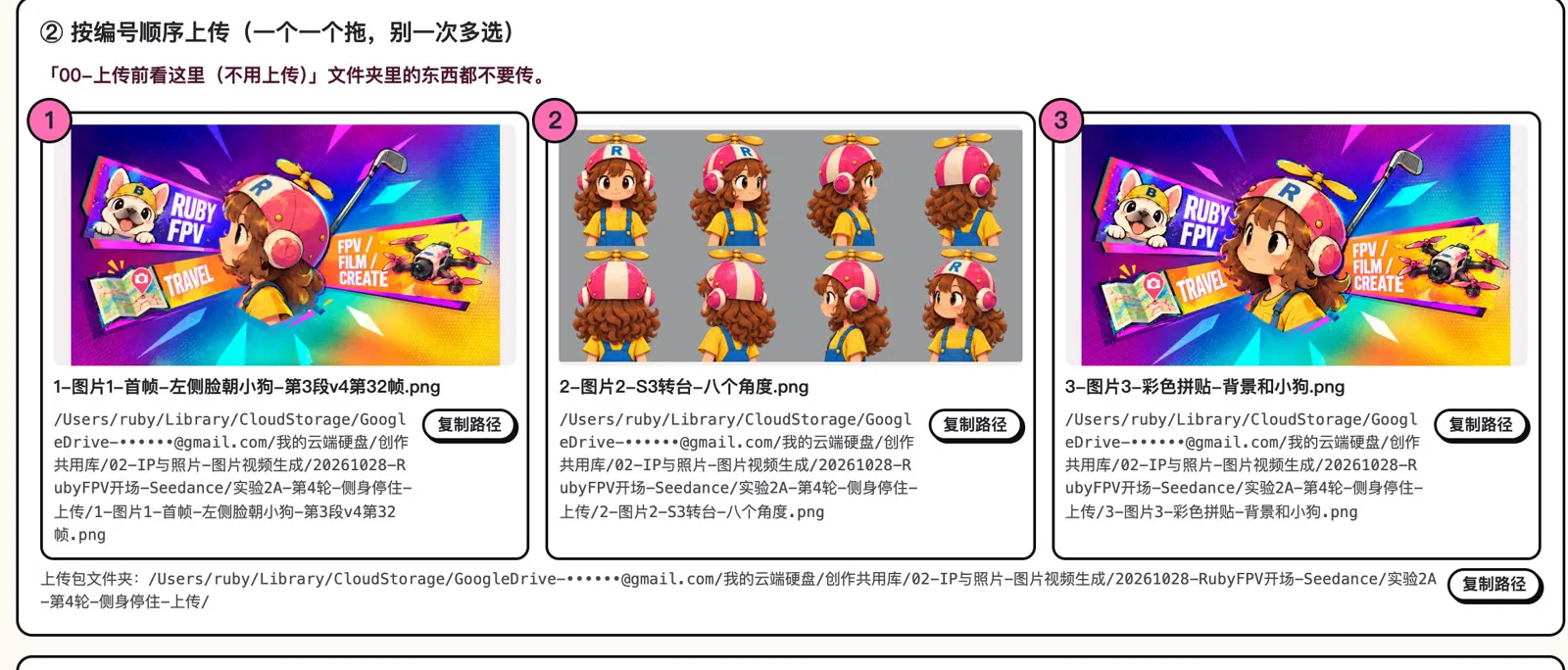
一台只管生成,一台负责接续,中间只走云盘。去生成时会备好三件套:按顺序编号的上传包、双击就能用的操作页(提示词一键复制,路径按当前电脑自动补全),和提前建好的结果文件夹。
One Mac only generates, the other picks up, and the cloud drive is the only bridge. Every generation run comes with a numbered upload pack, an action page that opens with a double-click (copy-ready prompt, file paths filled in for whichever Mac you’re on), and a results folder that’s already set up.
04
换对话,不丢进度New chat, same progress
对话太长或换阶段时,先写交接包:目标、已通过、卡点、准确路径、试过没用的方法、下一步、待核实。新对话读完就接着做,旧对话标「历史」只查不改。
When a chat gets too long or a phase ends, a handoff file goes first: the goal, what’s approved, what’s blocked, exact file paths, what didn’t work, the next step, and what still needs checking. A fresh chat reads it and carries on, and the old one is marked as history.
动效短片 · 续01 交接 v1
进度主记录:作品 W02-002,主线停在 W02-002.10(Ruby · 未开始)
- 项目目标和当前范围
- 已确认的方案、已通过的成果
- 未完成与卡点
- 准确入口(绝对路径)
- 试过没用的方法
- 下一步(负责人 + 验收)
- 待核实
真实交接包的开头(10 月 31 日,换新对话前写的)The opening of a real handoff file (Oct 31, written before switching chats; it’s in Chinese)
05
谁做的谁交回执Whoever did it signs it off
AI 只能勾自己负责的步骤;「做完了」「等本人确认」「已验收」分开记,我点「验收」才算真的完成。进度只看记录,不靠聊天里一句「好了」。
An AI can only tick its own steps. “Done”, “waiting for the owner to confirm” and “approved” are logged separately, and nothing counts as finished until I approve it. Progress comes from the log, not from an AI saying “all set” in a chat.

和现有工具比Compared with what’s out there
每一块都有人做,连起来的没有Each piece exists. Nobody connects them.
| 类别Category | 擅长Good at | 不管的Leaves out |
|---|---|---|
| 创作者 Notion 模板Creator Notion templates | 选题、脚本、发布排期Ideas, scripts, publishing calendar | 全靠手填;不知道每步用哪个提示词、哪些素材All manual; no idea which prompt or files each step needs |
| AI 编程看板AI coding boards | 让几个编程 AI 分工Splitting work between coding agents | 只在代码仓库里,不管出图出视频Lives in code repos; no images or video |
| 会话续接工具Session-handoff tools | 把聊天上下文搬到新对话Moving chat context to a new session | 没有给人看的进度、素材和验收No progress view, files or sign-off for the human |
| AI 创作画布AI creative canvases | 提示词和结果连在一张画布上Prompts and results on one canvas | 只在它的平台里,管不到你自己的几个 AI 和两台电脑Locked to their platform; can’t reach your own AIs or your two computers |
| 接力台Relay Desk | 人、几个 AI、两台电脑在同一份记录里;每一步都知道用哪个提示词、哪些素材、交给谁You, several AIs and two computers in one log; every step knows its prompt, its files and who’s next | |
少做的重复事Less repeat work
它具体帮我省掉了什么What it actually takes off my plate
挨个问 AI「做到哪了」Asking each AI “where are we?”
打开面板,看「现在停在哪」Open the page and read “where things stopped”
翻聊天找提示词、找素材、排顺序Digging through chats for prompts, files and order
点「一键开始」,三样一起备好Hit “Start” and all three are ready
新对话从头解释Explaining everything to a new chat
贴交接包,接着做Paste the handoff note and keep going
数字来自 10 月 29–31 日的真实记录。每一步具体省了几分钟还没计时,下周用统计脚本前后对比后再更新这里。Numbers come from my real logs, Oct 29–31. I haven’t timed exactly how many minutes each step saves yet; I’ll measure before and after next week and update this.
还没做的Not built yet
早期版本,下面这些是接下来的计划Early version. Here’s what’s next.
你做内容时,最常卡在哪一步?Where do you get stuck most?
找素材、换对话,还是等另一台电脑?在视频下面留言告诉我,票最多的我先优化。想要我整理成模板,评论「接力」。
Finding files, starting new chats, or waiting on the other computer? Tell me in the comments under the video, and I’ll fix the one with the most votes first. Want this as a template? Comment “relay”.